







Docling × MLX-VLM: how IBM Research runs document AI 5.4× faster on a Mac
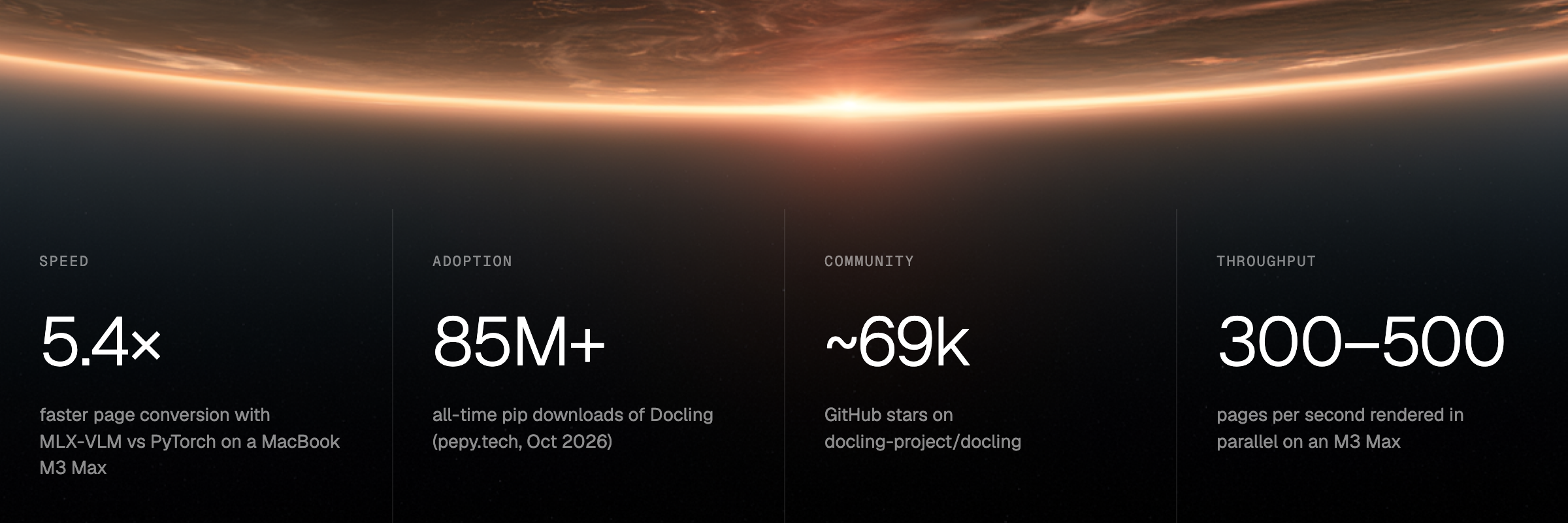
Docling is IBM Research's open-source toolkit for turning documents (PDFs, slide decks, Word files, spreadsheets, emails and scans) into structured data that AI systems can use. In two years, Docling has been downloaded more than 85 million times.
The project is led by Peter W. J. Staar (Principal Research Staff Member), Michele Dolfi (Senior Technical Staff Member) and Christoph Auer (Senior Research Scientist).
On Apple Silicon, Docling runs its document models through MLX-VLM, our open-source inference engine. Measured with Granite for Docling 2B on a MacBook with an M3 Max:
- One page: 14.4 seconds with PyTorch 2.12.1, 5.1 seconds with MLX-VLM. About 2.8× faster.
- A batch of four pages: 45.9 seconds with PyTorch, 8.4 seconds with MLX-VLM. About 5.4× faster.
We talked with the Docling team about why that matters to their customers, and what it has made possible for their millions of users.
Why local matters for document AI
For a bank, a hospital or a law firm, sending documents to the cloud is a decision that needs sign-off. Running locally removes that decision. Contracts, medical records and financial filings are often the most sensitive data a company holds. Running Docling on the user’s own Mac, even one with no network connection, changes what those teams can do.
No new cloud vendor to approve
In regulated industries, every AI model a company wants to use must pass a compliance review. If the model runs in the cloud, the company must also approve the vendor that hosts it, which means a security review, a data processing agreement and legal sign-off. When Docling runs locally, the model is a file on the company’s own Macs. The compliance team reviews that one file and approves no third party. Months of vendor review become one file check.
Sensitive details are removed before anything reaches the cloud
Before any AI can answer questions about a contract or a medical file, the PDF must be converted into text the AI can read, and Docling does that conversion. Whoever runs the conversion sees everything in the document, so that is the point where you decide what leaves. If parsing runs locally, a company can find and strip names, account numbers and medical details on the laptop, then send only the cleaned text to a cloud model. The cloud only sees what the company decides to send.
The approved model never changes the results
A local model is a fixed file. A cloud API can update or replace its model without notice. A hospital’s compliance team tests the Docling model once, signs off, and can name the exact file and version when a regulator asks which model reads patient records.
The same document also gives the same output every time. A law firm that extracts clauses from 10,000 contracts in 2026 can rerun the identical model in 2029 and prove how the record was produced. With a cloud API, the 2026 result can no longer be reproduced in 2029.
It is also cheaper: no per-page API fees, no rate limits, and it keeps working offline.
Why MLX-VLM is faster on a Mac
MLX-VLM is built only for Apple Silicon, while PyTorch and other generic backends are built to run on any hardware. Generic backends copy data between the processor and the graphics chip, and some steps fall back to the slower processor. MLX-VLM keeps everything in the Mac’s shared memory and runs every step on the graphics chip.
What’s next: Docling on the Mac from day one
Today, a developer on a Mac installs Docling and gets the speedup automatically. Docling detects Apple Silicon and switches to MLX-VLM with no setup.
IBM Research and Neywa Labs continue to work together on running document AI locally. The goal is for each new Docling model to run on Apple Silicon through MLX-VLM when it is released, so a user on a Mac never waits for a new model.
In their words
Every time we release a model, the first thing Mac developers ask for is an MLX version. With MLX-VLM, Docling runs on Apple Silicon out of the box, and a page that took 100 seconds now takes 6.
Peter W. J. StaarPrincipal Research Staff Member, IBM Research
Try it
pip install "docling[vlm]" mlx-vlm
docling --pipeline vlm document.pdf